⌨️
A keyboard, everywhere
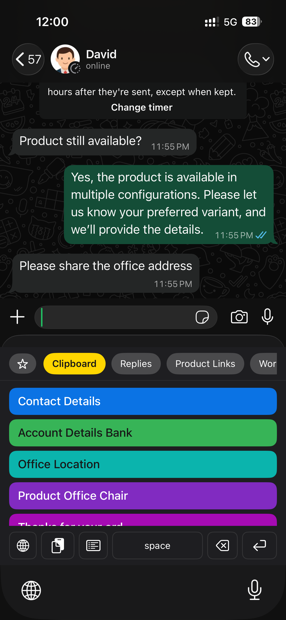
Hold the globe key, pick Clipboard, tap a clip. It pastes into whatever app you are in — Mail, WhatsApp, Safari, anything.
 Clipboard
iPhone · 3-day free trial
Clipboard saves what you copy and puts it right on your keyboard — so you can paste an address, a bank detail or a canned reply inside any app, without switching back and forth.
Requires iOS 16 or later · No account · No ads
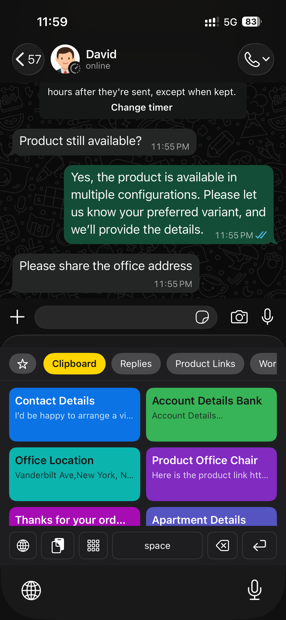
Hold the globe key, pick Clipboard, tap a clip. It pastes into whatever app you are in — Mail, WhatsApp, Safari, anything.
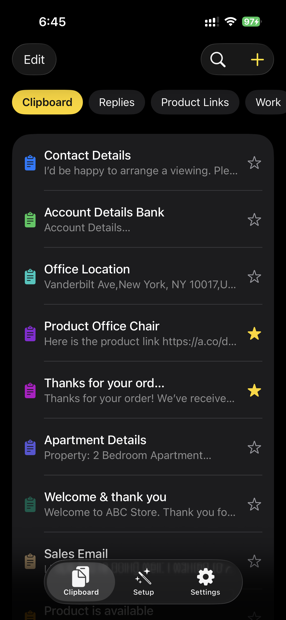
Everything you copy lands in the list on its own. Nothing to save, nothing to remember.
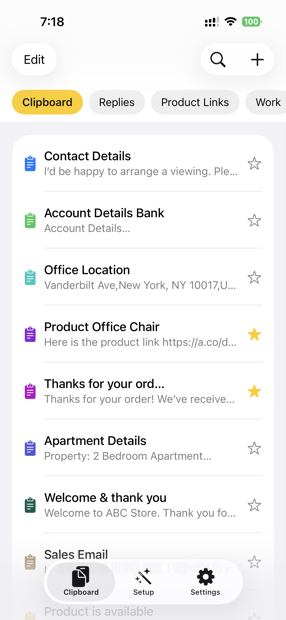
Keep replies, product links and work notes in their own tabs, each with a colour you choose.
Star the ones you use daily so they sit at the top. Hide the ones you would rather not see in the list.
Save pictures alongside text and paste them the same way.
Deleted clips sit in the trash until you put them back or clear them for good.
The app walks you through Settings → Keyboards and switching on Full Access, which is what lets the keyboard read your saved clips.
Copy anything and it appears in the list. Or write a clip yourself with the + button and file it under a category.
Hold the globe key, switch to Clipboard, tap the clip. Done.
Everything you save stays on this device. Nothing is uploaded, nothing is kept on a server, and the keyboard does not record or monitor what you type. Full Access is asked for one reason only: without it, a custom keyboard cannot read the clips you saved in the app.
Read the privacy policyiOS keeps custom keyboards sealed off from the rest of the phone unless you grant Full Access. Clipboard needs it to read the clips saved in the app. It is not used to record, log or send anything you type.
Inside any app, press and hold the globe key on the keyboard and pick Clipboard from the list. If it isn’t there, open Settings → General → Keyboard → Keyboards and add it.
No. Clips live on the device that saved them — that’s what keeps them private.
Clipboard is free to download and includes a 3-day free trial with every feature unlocked. You are not charged automatically when the trial ends. To keep using the app after the trial, choose a yearly subscription (renews automatically until you cancel it in Settings) or a one-time lifetime purchase, both paid through the App Store. See the Terms & Conditions for details.